Does a Laptop Have a Lithium Battery? What’s Inside and Why It Matters
Yes. Almost every laptop made in the last twenty years runs on a lithium battery, and the one in yours almost certainly does too. The exact type is usually lithium-ion or its close cousin, lithium-polymer. Both store a lot of energy in a small, light package, which is the whole reason your laptop can run for hours away from a wall socket.
That simple yes opens up a few practical questions. Which kind do you have? How can you check? How do you keep it healthy, and can you take it on a plane? Here’s everything that follows from knowing your laptop is powered by lithium.
What kind of lithium battery is in a laptop?
Laptops use one of two closely related types, and both are lithium-based.
Lithium-ion (Li-ion) is the most common. It packs energy into rigid cells, often shaped like small tubes or flat rectangles, and it gives a strong balance of capacity, weight, and cost. This is what sits inside most mainstream laptops.
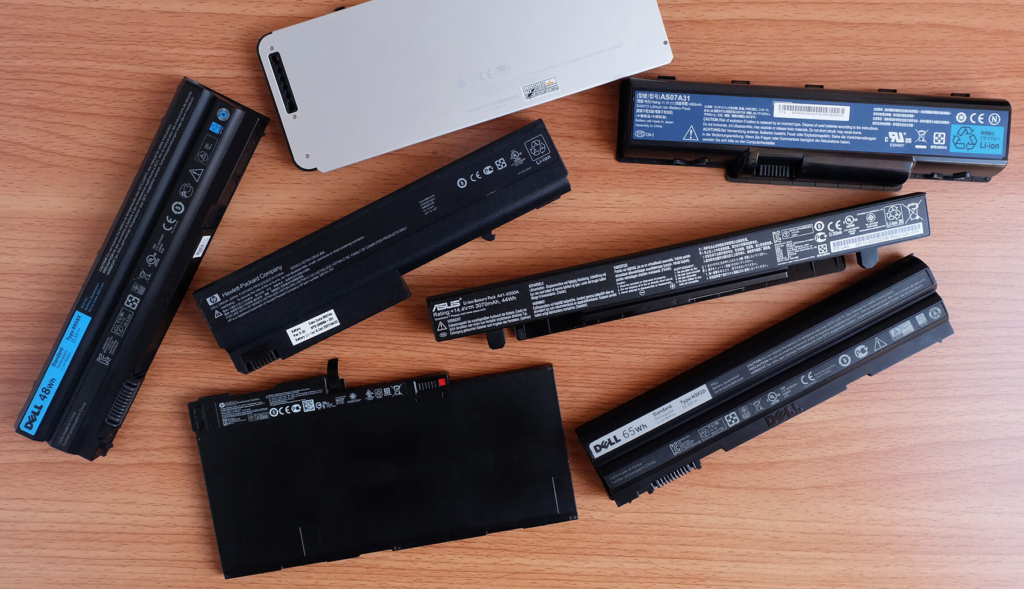
Lithium-polymer (Li-Po) is a variation that uses a soft, pouch-style casing instead of a hard shell. That lets makers mold the battery into thin, flat shapes, so you’ll find it most often in slim ultrabooks where every millimeter counts. It works on the same basic chemistry, just in a more flexible body.
For day-to-day use the difference barely matters. Both are lithium, both recharge the same way, and both need the same care. The label on the battery or in your laptop’s spec sheet will usually say which one you have.
Quick takeaway: if your laptop is from roughly 2010 onward, it has a lithium battery, and it’s either Li-ion or Li-Po. Older nickel-based batteries are essentially gone from new machines.
How can you tell what battery your laptop has?
You don’t need to open anything up. There are a few easy ways to confirm the battery type, from quickest to most certain.
- Check the label. If your laptop has a removable battery, pop it out and read the print on it. Look for “Li-ion”, “Lithium-ion”, “Li-Po”, or “Lithium-polymer”. A warning like “Do not incinerate” or a crossed-out bin symbol is another lithium giveaway.
- Look up the spec sheet. Search your exact model number plus the words “battery type” or “specifications”. The maker’s own page will list the chemistry. Dell, for example, states plainly that its laptops use lithium-ion batteries.
- Run a battery report on Windows. Open Command Prompt and type powercfg /batteryreport. Windows saves an HTML file that lists the chemistry, the design capacity, and how much the battery can still hold today.
- Use System Information on a Mac. Hold Option and click the battery icon, or open System Information and look under Power. Apple laptops use lithium-polymer batteries.
Any one of these will settle it in under a minute. The battery report is also the best way to see how worn your battery has become, which is handy if runtime has been dropping.
Why laptops use lithium batteries
Lithium won out for one main reason: energy density. It stores more power for its weight than the older battery types, so you get longer runtime without lugging around a heavier machine.

Before lithium took over, laptops used nickel-cadmium and then nickel-metal hydride batteries. Those were heavier, bulkier, and held less charge. They also suffered from a “memory effect”, where the battery slowly lost capacity if you didn’t drain it fully before recharging. Lithium has no real memory effect, charges quickly, and loses very little charge while sitting unused.
There are trade-offs. Lithium cells cost more to make and need built-in circuitry, a small battery management system, to keep them working safely. But the gains in size, weight, and runtime are big enough that lithium has been the standard for years, and it’s why your laptop is as portable as it is.
How long does a laptop lithium battery last?
Most laptop lithium batteries hold up well for two to four years of regular use, or roughly 300 to 500 full charge cycles. A cycle means one full drain and recharge, so two half-charges count as one cycle, not two.
After that, the battery doesn’t die suddenly. It just holds less and less charge, so your runtime quietly shrinks. A battery that once ran for eight hours might give you four, then two. All lithium batteries degrade over time, and charging to 100 percent constantly, draining to empty often, and heat all speed it up.
Many people replace the whole laptop before the battery becomes a real problem. If yours is fading and the laptop is otherwise fine, a battery replacement is often possible, though newer slim models can make it a job for a technician rather than a quick swap.
How to take care of a laptop lithium battery
Lithium batteries last longest when you avoid the two things they hate most: extreme charge levels and heat. A few simple habits make a real difference.

- Keep it in the middle. Charging between roughly 20 and 80 percent puts the least stress on a lithium battery. Sitting at a full 100 percent for long stretches wears it faster.
- Use the built-in limits. Windows and macOS now include battery health features, and many makers add a charge cap that holds the battery at around 80 percent. Turning these on is the easiest win.
- Don’t run it flat all the time. The occasional full drain won’t hurt, but regularly emptying a lithium battery to zero shortens its life.
- Keep it cool. Heat is hard on lithium. Avoid leaving your laptop in a hot car or working with the vents blocked on a soft surface like a bed or couch.
- Store it half-charged. If you’re putting a laptop away for weeks, leave it around 40 to 60 percent in a cool spot rather than full or empty.
Leaving a laptop plugged in all day is fine for most people, especially with a charge limit switched on. For more detail on healthy charging, Apple’s battery health management guide for Mac notebooks is a clear, reliable read that applies broadly to laptop lithium batteries, not just Apple’s.
Can you take a laptop lithium battery on a plane?
Yes, and the rules are easier than they sound. A normal laptop battery is well within the limits, so you can fly with your machine without any special steps.
Air travel rules for lithium batteries are based on a rating called watt-hours (Wh), which measures how much energy the battery holds. The figure is usually printed on the battery itself. Most laptops fall between about 40 and 90 Wh, comfortably under the key cut-off.
| Watt-hour rating | Typical use | Air travel status |
| Up to 100 Wh | Almost every standard laptop | Allowed in carry-on, no approval |
| 101 to 160 Wh | Some large or extended batteries | Carry-on only, airline approval, two max |
| Over 160 Wh | Rare in laptops | Not allowed on passenger flights |
The main rules to remember: keep your laptop in your carry-on or personal bag, not checked luggage, and any spare lithium batteries and power banks must travel in the cabin too, never in the hold. If a damaged battery starts to overheat, the cabin is where the crew can deal with it quickly. You can read the full breakdown on the FAA’s PackSafe page for lithium batteries.

So for almost everyone, the answer is simple: pack the laptop in your hand luggage and you’re set. Only oversized or aftermarket extended batteries get into approval territory.
Frequently asked questions
Is a laptop battery lithium-ion or lithium-polymer?
Usually one or the other, and both are lithium. Lithium-ion is most common in mainstream laptops, while slim ultrabooks often use lithium-polymer for its thinner shape. Check the battery label or your model’s spec sheet to confirm.
How do I check what battery my laptop has?
On Windows, run powercfg /batteryreport in Command Prompt to see the chemistry and capacity. On a Mac, open System Information under Power. You can also read the label on the battery or your model’s spec page.
Do all laptops have lithium batteries now?
Effectively yes. Nearly every laptop sold since around 2010 uses a lithium-ion or lithium-polymer battery. Older nickel-cadmium and nickel-metal hydride batteries have been phased out of new machines.
Is it safe to fly with my laptop battery?
Yes. Standard laptop batteries sit under 100 watt-hours, which airlines allow in carry-on with no approval. Keep the laptop and any spare batteries in the cabin, never in checked luggage.
How long does a laptop lithium battery last?
Around two to four years, or 300 to 500 full charge cycles. It won’t fail suddenly; it slowly holds less charge, so runtime shrinks over time. Good charging habits help it last longer.
Conclusion
Yes, your laptop has a lithium battery, almost certainly lithium-ion or lithium-polymer. Both store lots of energy in a light, compact form, which is what makes a laptop portable. Check yours through the label, the spec sheet, or a battery report, keep the charge in the 20 to 80 percent range, avoid heat, and pack it in your carry-on when you fly. Do that and you’ll get the most years out of it.