The true statement is that most of the internal components designed for laptops cannot be used in desktops. Laptop parts are shaped to fit one specific chassis, so they are mostly proprietary and will not drop into a standard desktop.
That answers the four-option version of this question. A second version compares laptops with desktop computers, and its answer is different: a laptop’s battery keeps the machine running when the power goes out. Both are covered below, along with the reason every other option fails.
Which statement is true about laptops?
The correct option is that most of the internal components that are designed for laptops cannot be used for desktops.
| Option | Verdict | Why |
|---|---|---|
| Most of the internal components that are designed for laptops cannot be used for desktops | True | Laptop parts are custom shaped for one chassis, and most are proprietary |
| Laptop motherboards have standard form factors | False | The board shape changes with the manufacturer and the model |
| Laptops use fewer components than desktops use | False | Same core parts, plus a screen, battery, keyboard, touchpad and webcam built in |
| Laptop CPUs do not use cooling devices | False | They use a heat sink, copper heat pipes and at least one fan |
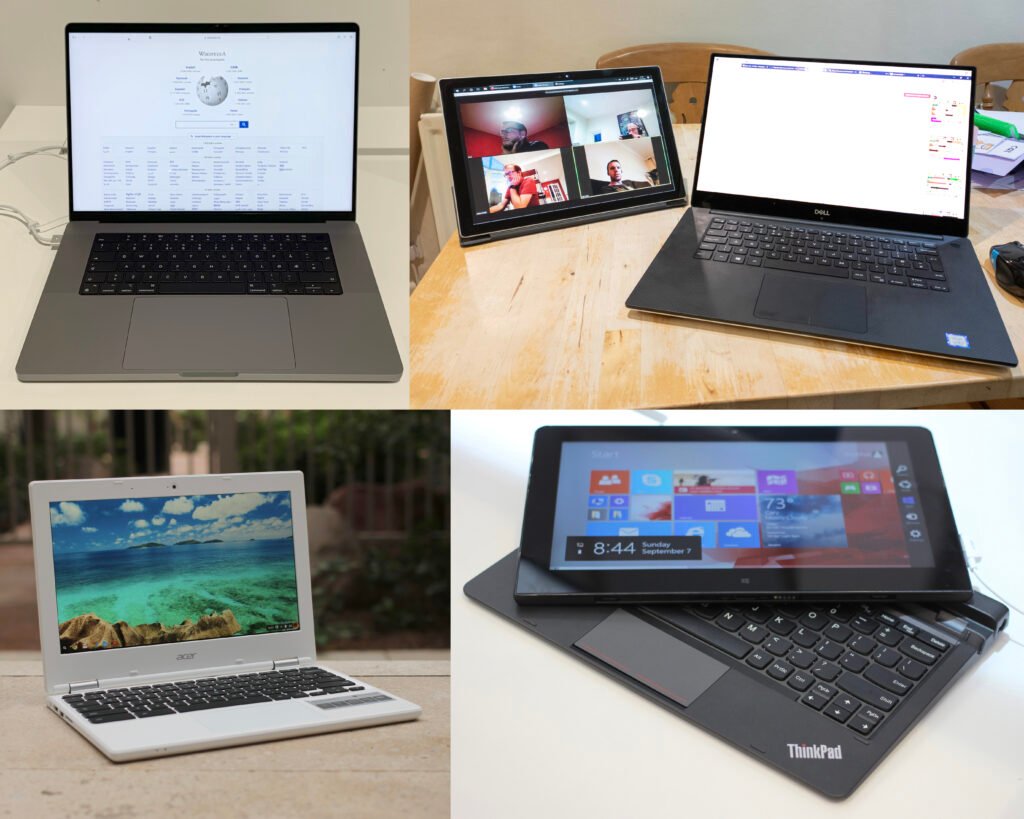
The word “most” is doing real work in that sentence. A few parts do cross over, and those are covered further down. But the bulk of what sits inside a laptop, including the motherboard, the processor, the screen, the battery and the keyboard, is built for that one model and nothing else.
Why laptop parts do not fit a desktop
Everything inside a laptop is designed around one goal: fitting a whole working computer into a case roughly two centimetres thick that also runs on a battery. That goal forces choices a desktop never has to make.
The processor shows this most clearly. Nearly every laptop CPU is soldered straight onto the motherboard using a ball grid array, which is a pattern of tiny solder balls under the chip. Intel’s spec sheet for the Core Ultra 7 155H lists its package as FCBGA2049 and its size as 50 mm by 25 mm. There is no socket, no lever and no way to lift the chip out. Desktop processors work the other way round. They drop into a socket such as Intel’s LGA1851 or AMD’s AM5, and you can swap one in a couple of minutes.
The motherboard follows the same logic. It is cut to wrap around the battery, the fans, the hinge and the port layout of a single model, and the ports sit exactly where the holes in that shell are.
The screen connects over eDP, a display link built into the board rather than a cable you can unplug and use elsewhere. The battery is a flat pack with a model-specific connector. The keyboard is a thin ribbon assembly screwed to the top case. None of it has a desktop equivalent.
Quick rule: if a part is soldered down or shaped around the case, it stays with that laptop. If it slides into a slot, it has a chance of fitting a desktop.
Which laptop parts do work in a desktop?
A few parts follow open standards, and those move between the two without trouble.
Storage is the main one. An M.2 NVMe solid state drive in the common 2280 size, meaning 22 mm wide and 80 mm long, fits an M.2 slot on a desktop board just as well as one in a laptop. Older 2.5 inch SATA drives work in both as well.
Memory does not cross over, even though it looks like it should. Laptops use short SO-DIMM modules and desktops use full length DIMMs. JEDEC, the group that publishes memory standards, sets DDR4 SO-DIMMs at 260 pins and DDR5 SO-DIMMs at 262 pins, while desktop DDR4 and DDR5 DIMMs both use 288 pins. The notch sits in a different place, so a laptop stick physically cannot seat in a desktop slot.
Thin laptops are moving further away from shared parts, not closer. Many now solder the memory to the board, and some use a CAMM2 module that has no desktop equivalent at all.
Why the other three options are false
Laptop motherboards have standard form factors
False. A form factor is a published set of dimensions and mounting points that any manufacturer can build to. Desktop boards follow them closely. ATX measures 305 by 244 mm, microATX is 244 by 244 mm, and Mini-ITX is 170 by 170 mm. Buy any ATX board and it bolts into any ATX case.
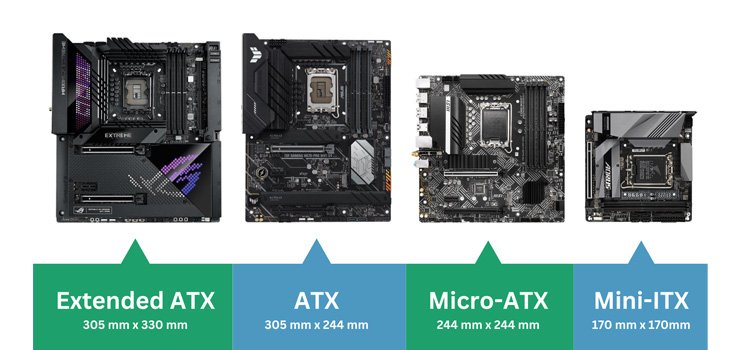
Laptop boards have nothing like that. The shape changes from one manufacturer to the next, and often from one model to the next inside the same brand. That is why a replacement board is ordered by exact model number rather than by size.
Laptop CPUs do not use cooling devices
False. A laptop processor draws less power than a desktop one, but it still turns most of that power into heat inside a much smaller space. Almost every laptop has a heat sink, one or more copper heat pipes and at least one fan. Intel rates the Core Ultra 7 155H at 28 W base power, allows up to 115 W in short bursts, and gives it a maximum operating temperature of 110 degrees Celsius. Fanless laptops do exist, and they still use a metal spreader to pull heat away from the chip.
Laptops use fewer components than desktops use
False. A laptop holds the same core parts as a desktop: processor, memory, storage, motherboard and cooling. On top of those it has a display panel, a battery, charging circuitry, a keyboard, a touchpad, speakers, a webcam and wireless radios, all built in. A desktop leaves most of that to separate devices you buy and plug in, so the laptop is the one carrying more parts.
Which statement is true about laptops and desktop computers?
In this version of the question the correct option is that if the power goes out, a laptop’s battery serves as a backup power source.
A laptop carries its own power supply, so a blackout does not interrupt it. The machine switches to battery and keeps running, which is the same job an uninterruptible power supply does for a desktop. A desktop without one shuts off the moment mains power drops, and any unsaved work goes with it.
The rest of the options in that set fail for simple reasons:
- Desktops are not more portable than laptops. Portability is the whole reason laptops exist.
- You cannot pick almost any combination of monitor, keyboard and mouse when buying a laptop, because all three are built in.
- Setting up a desktop is not easier. A laptop needs a charger and a power button, while a desktop needs a monitor, keyboard, mouse and cables connected first.
- Desktops do not have a built-in touchpad. That is a laptop feature, and a desktop uses a separate mouse.
How to pick the true option quickly
Options built on absolute words are usually the false ones. “Standard”, “do not”, “any” and “fewer” leave no room for exceptions, and computer hardware is full of exceptions. The option that survives here is the hedged one, the sentence that says most components rather than all of them.

Picturing the physical object helps too. Ask whether you could hold the part in your hand and slot it into a desktop. For a laptop motherboard, a soldered processor or a screen panel, the answer is plainly no, and that is the whole point of the question.
Frequently asked questions
Can I put laptop RAM in a desktop?
No. Laptop memory uses SO-DIMM modules with 260 pins on DDR4 and 262 pins on DDR5, while desktop DIMMs use 288 pins. The notch sits in a different position, so the module will not seat in the slot.
Do laptop motherboards have a standard form factor?
No. Desktop boards follow published standards such as ATX and Mini-ITX, but a laptop board is built around one chassis. The shape varies by manufacturer and model, so replacements are ordered by exact model number.
Do laptop processors need a fan?
Most do. A laptop CPU pairs a heat sink and copper heat pipes with one or two small fans. A few low-power models run without a fan, but they still use a metal spreader to move heat away from the chip.
Which laptop parts can be reused in a desktop?
Mainly storage. M.2 NVMe drives in the 2280 size and 2.5 inch SATA drives fit both. Almost everything else, including the board, processor, screen and battery, is specific to that model.
Why are laptop components proprietary?
Space. Every part is shaped around the exact case, hinge, fan layout and port positions of one model, which leaves no room for standard-sized hardware.
Conclusion
The true statement is that most internal components designed for laptops cannot be used in desktops, because those parts are shaped and soldered for one specific model. The other three options fail: laptop boards have no standard form factor, laptop CPUs need heat sinks and fans, and laptops carry more built-in parts than desktops rather than fewer. When the question compares laptops with desktop computers, the answer is the battery acting as backup power.
Recommened Articles:
How to Freeze a Screen on a Laptop: Every Method That Works
How to Use a Laptop Cooling Pad the Right Way
Why Does My Laptop Shut Off Randomly? Causes and Fixes
How to Remove a Stripped Screw From a Laptop (Without Wrecking It)