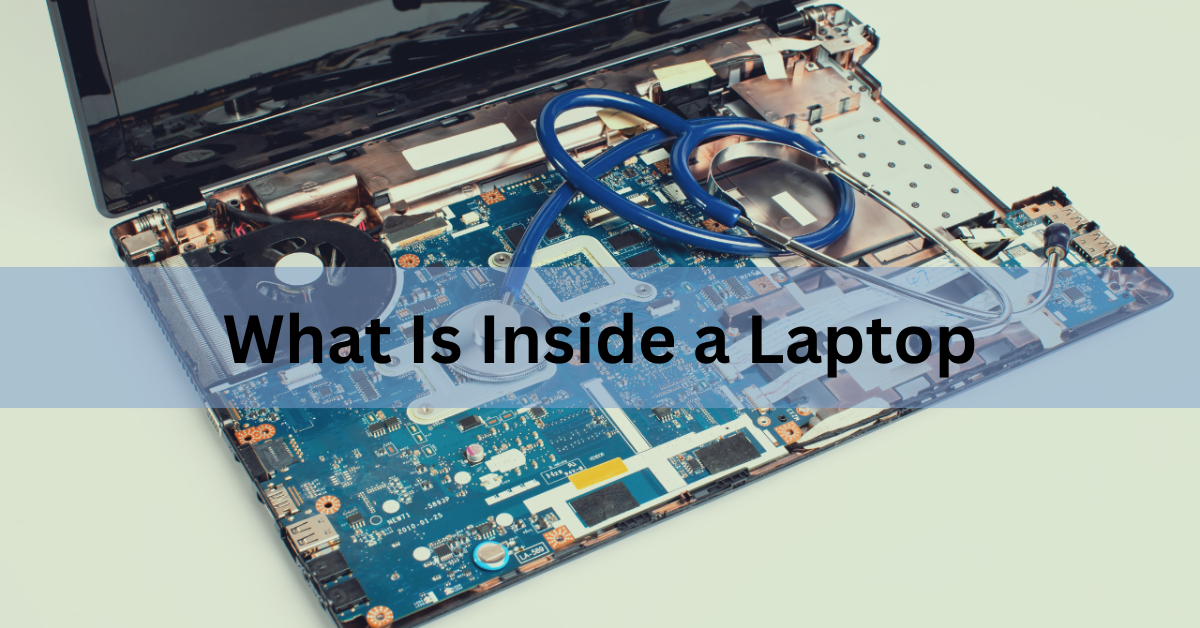
Inside a laptop you’ll find about ten main parts: a motherboard, a processor (CPU), memory (RAM), storage (an SSD), a battery, a cooling system of fans and copper heat pipes, a wireless card, speakers, and the ribbon cables that link the screen, keyboard, and trackpad back to the board. Take the bottom cover off a modern machine and most of the space is battery. The rest is one green circuit board with everything else soldered or slotted onto it.
Here’s what each part does, how to spot it, and which pieces you can actually replace.
The motherboard is the base everything plugs into
The motherboard is the main circuit board, and every other part connects to it. It carries power, data lines, and the small controller chips that let the parts talk to each other.
Laptop motherboards are shaped to fit one specific model. Desktop boards follow standard sizes like ATX, so any ATX board fits any ATX case. Laptop boards don’t work that way. Each one is drawn around the exact chassis it goes in, with cutouts for the fan, the hinge, and the port openings. That’s why a board from a 14-inch Dell won’t go into a 14-inch HP, and why replacement boards are model-specific and expensive.
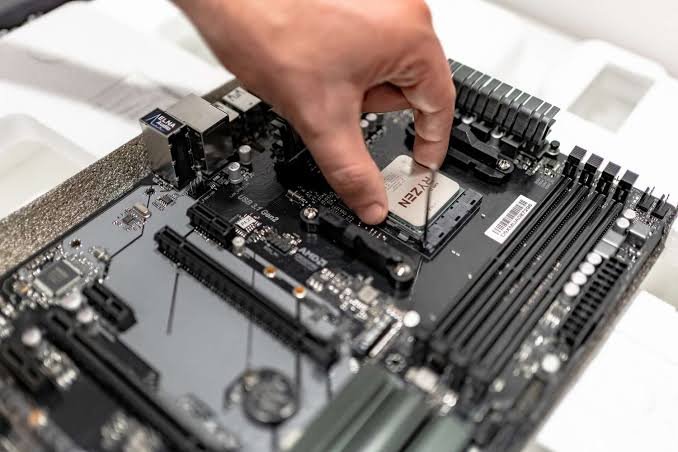
Most of what used to be separate cards now lives on this one board. Sound, networking, USB control, and often graphics are built into the chipset or into the processor itself. A laptop from 2005 might have had a removable sound card and a modem. Today those are a few square millimetres of silicon on the main board.
The board also holds the power delivery circuits, a cluster of small components near the CPU that step the battery voltage down to the roughly one volt the processor actually runs on, adjusting it hundreds of thousands of times a second as the load changes.
The CPU does the thinking, and it’s usually soldered down
The processor, or CPU, runs the instructions that make software work. It sits near the middle of the board under a metal plate, with the cooling hardware pressed on top of it.
In almost every laptop built in the last decade, the CPU is soldered permanently to the motherboard. This is called BGA mounting, short for ball grid array, meaning the chip sits on a grid of hundreds of tiny solder balls rather than in a socket with pins. You can’t swap it. If you want a faster processor, you buy a different laptop.
Two other processors often share the same package or sit close by:
- The GPU handles graphics. On thin and light laptops it’s built into the CPU and borrows system RAM. Gaming and creator machines add a separate GPU chip with its own dedicated memory soldered around it, which is why they get hot, weigh more, and need larger fans.
- The NPU handles AI work like live captions, background blur, and on-device transcription, using far less power than the CPU would for the same job. Microsoft’s Copilot+ PC requirements call for an NPU rated at 40 TOPS or higher, along with at least 16GB of RAM and a 256GB drive. TOPS means trillion operations per second.
You’ll also find a small amount of flash memory near the board edge holding the firmware, the UEFI (once called the BIOS), which wakes the hardware up and hands control over to Windows or macOS at startup.
RAM holds what you’re working on right now
RAM, or memory, is the short-term workspace. Open apps, browser tabs, and the file you’re editing all sit in RAM while the laptop is on. Cut the power and it empties. Storage is the filing cabinet; RAM is the desk.
RAM comes in two forms inside a laptop, and the difference decides whether you can ever upgrade it:
| Type | Where you’ll see it | Can you upgrade it? |
|---|---|---|
| Slotted (SO-DIMM) | Budget and mid-range laptops, business machines, most gaming laptops | Yes. Sticks lift out and clip back in. |
| Soldered (LPDDR5 / LPDDR5X) | Thin-and-light ultrabooks and many premium laptops | No. The chips are fixed to the board. |
Slotted SO-DIMM sticks clip into a socket at an angle and are easy to spot once the cover is off. Soldered LPDDR5X chips are small black rectangles fixed to the board right beside the processor. Keeping them that close is part of the point: shorter traces let the memory run faster and sip less power, which is how thin laptops reach speeds like 8,533 MT/s.
A newer option called LPCAMM2 sits between the two. It’s a flat module that screws down onto the board, giving the low power and high speed of LPDDR memory in a part you can still unscrew and replace. It appeared first in workstations and has since reached mainstream laptops.
If your laptop has soldered memory, the amount you buy is the amount you keep for the life of the machine. Look for the words “soldered” or “onboard” on the spec sheet before you order, and size up if you’re unsure.
The SSD stores your files when the power is off
Storage holds your operating system, programs, and files permanently. Modern laptops use an SSD (solid state drive), which keeps data in flash memory chips with no moving parts, so it reads far faster than the spinning hard drives it replaced and survives being knocked about.
Look for a thin stick roughly the size of a stick of gum, held down at one end by a single small screw. That’s an M.2 drive. The common size is 2280, which simply means 22mm wide and 80mm long. Some compact machines take shorter 2242 or 2230 drives, so measure before you buy.
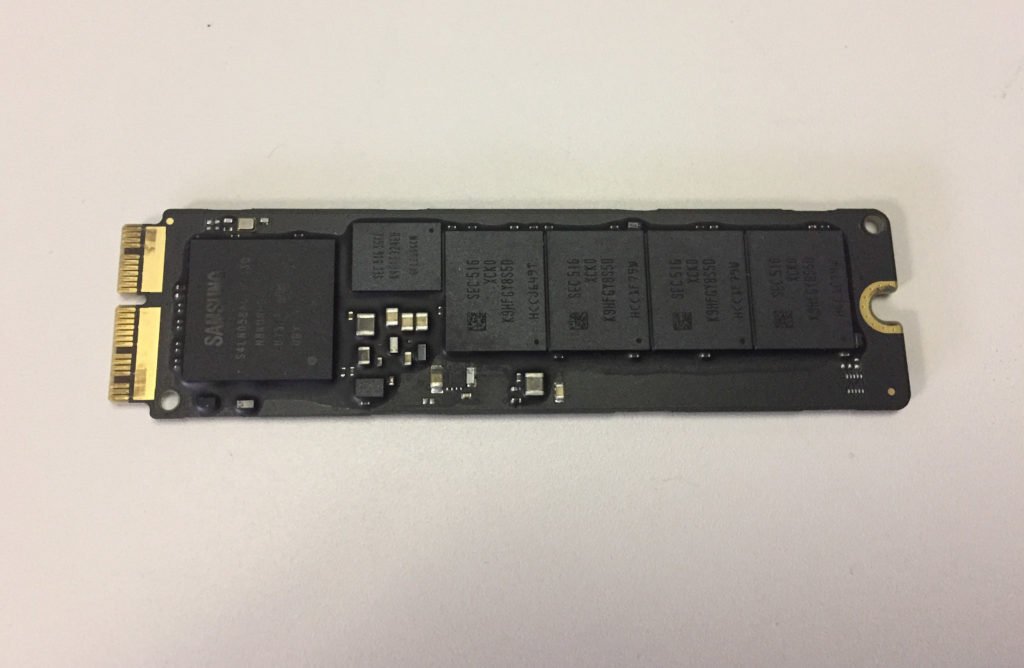
Most laptop SSDs use NVMe, a standard that talks straight to the processor over PCIe lanes instead of the older SATA path built for hard drives. The practical gap is large: a mid-range NVMe drive reads several thousand megabytes per second, while SATA tops out near 550.
This is the one internal part that stays upgradable on most laptops, thin ones included. Some models include a second empty M.2 slot, letting you add capacity without touching the original drive. Fast drives run warm, which is why you’ll often see a thin thermal pad or a small metal shield sitting over the SSD.
The battery takes up more room than anything else
The battery is usually the single largest object inside, often filling the whole front half of the chassis under the palm rest. It’s built from flat lithium-ion or lithium-polymer cells wired together, wrapped in foil, with a small circuit board at one end that manages charging and reports the charge level to the operating system.
Capacity is measured in watt-hours (Wh). Thin ultrabooks typically sit around 50 to 75Wh. Gaming and workstation laptops go higher, and many stop deliberately just under 100Wh, because the TSA limit for a lithium-ion battery installed in a device is 100 watt-hours. Cross that line and the laptop needs airline approval before it flies.
Batteries wear out from use, not age alone. Every full charge cycle takes a small amount of capacity with it, and after three or four years most packs hold noticeably less than they did when new. Windows will tell you exactly how much: run the command powercfg /batteryreport and it prints a page listing the design capacity next to the full charge capacity the pack manages today. A swollen battery that lifts the trackpad or bows the bottom cover should be replaced quickly, and never punctured.
The cooling system moves heat out to the edges
Cooling is what keeps the processor running at full speed. A laptop has no room for the tall finned heatsink a desktop uses, so it moves heat sideways instead of upwards.
Flat copper heat pipes run from a plate sitting on top of the CPU and GPU out to a stack of thin metal fins at the back or side of the machine. Each pipe is sealed and holds a small amount of liquid: it boils at the hot end, travels as vapour to the cool end, condenses back to liquid, and wicks along the inner wall to start again. That cycle shifts heat much faster than solid metal could. One or two blower fans then push air through the fins and out the vents. Higher-powered machines swap the pipes for a vapour chamber, a flat sealed plate that spreads heat across a much wider surface.
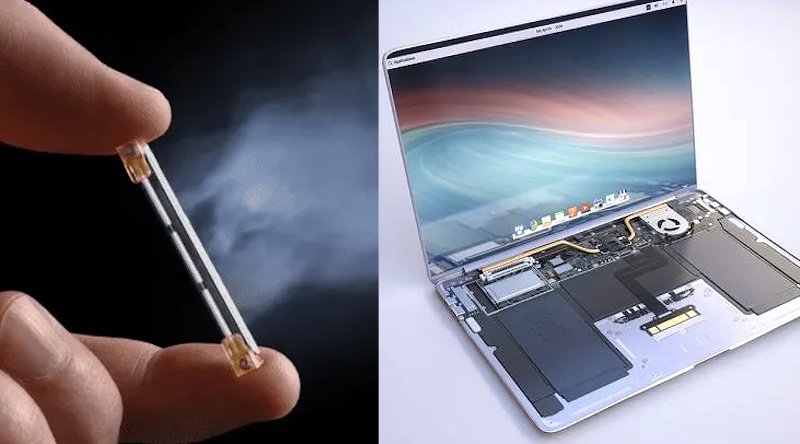
Between the chips and the metal sits a layer of thermal paste, or on some high-end models liquid metal, filling the microscopic gaps so heat crosses properly. Paste dries out over several years, which is part of why an older laptop runs hotter and louder than it did when new.
Dust packed into the fins is the most common cooling fault and the easiest to fix. When a laptop suddenly turns loud and slow under load, blocked fins are the first thing to check.
The smaller parts that fill the rest of the space
Several smaller pieces make up the remainder:
- The wireless card handles Wi-Fi and Bluetooth on one small module in its own M.2 slot, with two hair-thin antenna wires running up through the hinge into the screen bezel, away from the metal body. On many laptops this module is replaceable.
- The display cable is a flat ribbon running from the motherboard through the hinge to the panel, carrying both the video signal and the panel’s power.
- The keyboard and trackpad connect with similar ribbon cables into small flip-lock connectors near the front edge of the board.
- Speakers sit in the corners or fire down through slots in the bottom, driven by a small amplifier chip. There’s no separate sound card.
- The webcam and its microphones live in the top bezel with their own thin cable, which is why a webcam fault often means replacing the whole lid assembly.
- A coin cell battery, usually called the CMOS or RTC battery, keeps the clock and firmware settings alive while the laptop is unplugged and switched off.
What you can replace and what you can’t
Upgrade potential varies by model, but the pattern holds across brands:
| Part | Replaceable? | What to know |
|---|---|---|
| SSD | Usually yes | Match the M.2 length (2280 is standard) and check whether the slot is PCIe or SATA. |
| Battery | Usually yes | Buy a pack matched to your exact model number. |
| RAM | Depends | Slotted means yes, soldered means no. |
| Wi-Fi card | Often yes | Some business laptops only accept approved cards. |
| Fan | Often yes | Sold as a spare part for most models. |
| CPU and GPU | No | Soldered to the motherboard. |
| Motherboard | Only as a whole | Model-specific and usually the costliest repair. |
Before opening anything, shut the laptop down completely rather than putting it to sleep, unplug the charger, and once the cover is off, disconnect the battery from the motherboard before touching anything else. The board stays live otherwise. Keep track of screw lengths as you go, since bottom covers often use two or three sizes and driving a long screw into a short hole will crack the case.
Frequently asked questions
Can I add more RAM to my laptop?
Only if the memory is slotted rather than soldered. Slotted SO-DIMM sticks lift out and can be replaced with larger ones. Soldered LPDDR memory is fixed to the motherboard, so the capacity you bought is permanent.
What is the most expensive part inside a laptop?
The motherboard, because the CPU and usually the GPU are soldered to it, so a board replacement means replacing all three at once. On most models it costs a large share of the price of a new laptop.
Why does my laptop get so hot?
Usually dust blocking the cooling fins, or thermal paste that has dried out after a few years. Both restrict how fast heat reaches the vents. Cleaning the fins is straightforward; repasting is a job for a repair shop unless you’re confident.
Is the SSD inside a laptop the same as a hard drive?
They do the same job but work differently. A hard drive stores data on spinning magnetic platters. An SSD uses flash memory chips with no moving parts, so it’s much faster, quieter, and far more resistant to drops.
How do I see what’s inside my laptop without opening it?
On Windows, open Task Manager and click Performance for the CPU, RAM, and drive details, or type msinfo32 into the search bar for a full list. On a Mac, use About This Mac in the Apple menu.
Conclusion
Inside a laptop is one custom-shaped motherboard carrying a soldered CPU, memory that is either slotted or soldered, an M.2 SSD, a large lithium-ion battery, and a copper heat pipe and fan assembly moving heat out to the vents. Smaller parts handle wireless, sound, and the camera. Of all of it, the SSD is almost always replaceable, the battery usually is, and RAM depends entirely on the model. Check the memory spec before you buy, because that’s the one choice you can’t undo later.
How to Reset a Toshiba Laptop to Factory Settings (3 Ways)
How Long Should a Gaming Laptop Last?
What Laptop Screen Pressure Damage Is and How to Deal With It
How to Measure Laptop Dimensions: Full Step-by-Step Guide
Wacom Cintiq 22HD Not Connecting to Your Laptop? Here’s How to Fix It