
Yes, in most cases you can pack a laptop in your checked luggage, and no security agency will stop you at the door. But there are two catches. The laptop has to be switched fully off, and keeping it in your carry-on is almost always the smarter move. The rules that matter here are not really about the laptop at all. They are about the battery inside it. Once you understand that, the whole thing gets simple, and you will know exactly what to do with any device you travel with.
Here is the full picture: what you are allowed to do, why carry-on wins, and how to pack a laptop in the hold safely on the rare day you have no other option.
So can you check a laptop, or not?
You can. A laptop with its battery installed is allowed in checked baggage. The U.S. Transportation Security Administration permits it, and so do aviation authorities in most countries. The device just has to be turned all the way off, not left in sleep or hibernation, and packed so it cannot switch itself back on in the bag.

That last part trips people up. “Off” means shut down, with the screen dark and the fans silent. A laptop that wakes up when the lid shifts, or one buried under pressure that presses the power button, is the exact situation the rule is written to prevent. A device generating heat in a sealed cargo hold, with no one nearby to notice, is the risk.
So the short version is: allowed, with conditions. The longer version is that “allowed” and “a good idea” are two different things, and the gap between them is where most of this article lives.
It also helps to separate two questions that often get mixed together. One is whether security will let the bag through, and the answer there is yes. The other is whether your laptop survives the trip and stays in your hands, and that depends entirely on how you pack it and where you put it. Most of the worry people carry is really about the second question, even when they phrase it as the first.
Why the rules focus on the battery, not the laptop
Almost every laptop made in the last decade runs on a lithium-ion battery. These batteries are light, hold a lot of charge, and power nearly everything you carry. They also carry a small but real fire risk. If one is damaged, short-circuited, or badly overheated, it can enter a state called thermal runaway, where it heats up fast and can catch fire without warning.
That single fact drives the entire rulebook. In the passenger cabin, a battery that starts to smoke or burn gets noticed in seconds. Flight crews are trained to spot it, and they can reach it and put it out. In the cargo hold below the floor, no one is watching, and a fire has time to grow before anyone knows. So the whole system is built to keep batteries where people can see them.

Batteries are measured in watt-hours (Wh), which is just a number for how much energy they hold. The thresholds are the same across the industry. Anything up to 100 Wh is fine for normal travel, which covers essentially every standard laptop, phone, and tablet. Batteries between 101 and 160 Wh need your airline’s approval before you fly, and that range mostly shows up in high-end gaming laptops, professional camera rigs, and extended-life battery packs. Anything over 160 Wh is banned from passenger planes entirely, in the cabin or the hold.
Quick check: Your laptop’s watt-hour rating is usually printed on the underside of the machine or on the battery itself. If you don’t see it, multiply the voltage (V) by the amp-hours (Ah). A 12-volt battery rated at 8 Ah is 96 Wh, which sits safely under the limit.
For a sense of scale, a typical laptop battery holds somewhere between 40 and 90 Wh, so nearly every consumer machine clears the 100 Wh bar with room to spare. The devices that bump into the approval zone are the outliers: workstation-class gaming laptops with oversized batteries, and aftermarket extended-life packs built for all-day runtime. If you own one of those, the watt-hour number is worth reading before you get to the airport, because it decides whether you need to call your airline ahead of time.
The one hard rule: spare batteries and power banks stay with you
This is the part to get right, because it is the rule people break by accident. A spare battery or a power bank (a portable charger) is never allowed in checked luggage. Not powered off, not wrapped up, not “just this once.” They must travel in the cabin with you, every time.
The reason goes back to the battery logic. A loose battery sitting in a bag can short-circuit if its terminals touch metal, like keys or coins. A power bank has no software watching over it and no temperature sensors. If it fails, it does so silently, and if it is in the hold, no one can respond. So the line is clean: an installed battery inside a device can be checked, but a battery on its own cannot.
The full guidance on this lives on the FAA’s PackSafe lithium battery page, which is the primary source your airline follows. A few practical points that flow from it:
- Keep spares protected. Leave batteries in their original packaging, tape over the terminals, or slip each one into its own bag so nothing metal can touch the contacts.
- Gate-checking counts. If your carry-on gets taken at the gate because the bins are full, pull out any power banks and spare batteries first and carry them onto the plane by hand.
- Two is often the ceiling for big ones. For larger batteries in the 101 to 160 Wh range, most airlines cap you at two spares per person, and you need their approval first.
So even when your laptop rides in the hold, its charger and any backup battery stay in your carry-on. That split matters more than almost anything else here.
Why carry-on is still the smarter choice
The rules let you check a laptop, but the people who write those rules would rather you didn’t. Keeping it with you protects the device, your data, and your wallet. Here is how the two options compare once you line them up.
| Where it goes | Device with battery installed (your laptop) | Spare / loose lithium battery or power bank |
| Carry-on | Allowed, and recommended | Allowed (carry-on only) |
| Checked bag | Allowed if fully powered off | Not allowed, ever |
| Gate-checked bag | Remove and keep the device with you if you can | Must be removed and kept with you |
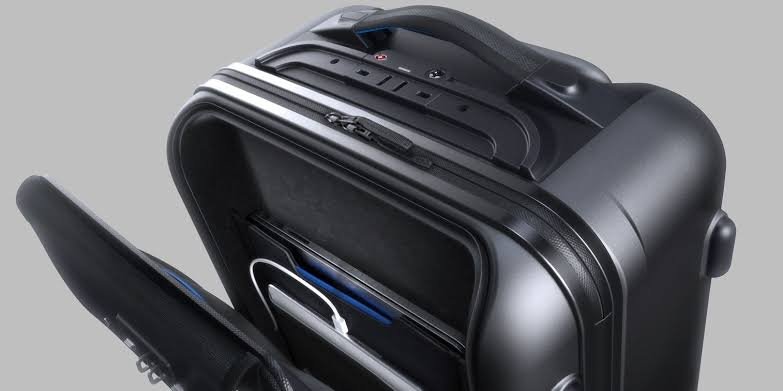
Beyond the rules, three real-world risks make the cabin the better home for a laptop.
Rough handling
Checked bags get thrown, stacked, rolled, and dropped. They ride conveyor belts, sit in the cold of a cargo hold, and land under the weight of other suitcases. A laptop is a thin sheet of glass and a spinning or soldered drive inside a light case. Even a sturdy suitcase is not built to absorb the kind of impact that cracks a screen or kills a hard drive. A padded compartment on your back does that job far better.
Theft
Once your bag disappears down the belt, you have no idea who handles it or for how long. A standard suitcase lock is not hard to defeat, and a laptop is a high-value, easy-to-grab target. When the bag is out of your sight, so is any control over what happens to it.
Loss and weak compensation
Bags get delayed and lost every day. If yours holds only clothes, that’s an annoyance you can fix at your destination. If it holds your laptop, the stakes jump to lost work, lost files, and possible exposure of sensitive data. And airlines usually limit what they will pay for damaged or missing electronics, so even a valid claim may not cover what the machine is worth. The math rarely favors checking it.
There’s a quieter cost too. A laptop often holds saved passwords, work documents, and personal accounts. If the bag is stolen rather than just misplaced, that’s not only a hardware loss, it’s a potential doorway into your digital life. Keeping the device with you, or at minimum encrypting the drive and logging out of sensitive accounts before you check it, closes that door.
How to pack a laptop in checked luggage if you have no choice
Sometimes it’s unavoidable. The overhead bins are full, your carry-on gets gate-checked, or you’re simply carrying too much to keep the laptop in the cabin. If the laptop has to go in the hold, these steps cut the risk as much as possible.
- Back up your files first. Copy anything important to the cloud or an external drive before you leave. If the bag goes missing, your work and photos don’t go with it.
- Shut the laptop all the way down. Full power off, not sleep and not hibernate. Confirm the screen is dark and nothing is running.
- Take the charger and any spare battery out. The device can be checked, but its power bank and loose batteries move to your carry-on. This is the rule you cannot skip.
- Wrap it in something soft. A padded sleeve or hard-shell case is best. No case? Wrap the laptop two or three times in a thick sweater or towel, paying attention to the corners and screen edges, which take the hardest hits.
- Put it in the middle of the bag. Center the laptop, cushioned by clothes on every side. Keep it away from the edges and away from anything hard or anything that could leak, like toiletry bottles.
- Clear out loose metal and small objects. Pull USB drives, mice, and cables away from the machine. Small hard items can scratch the screen, and stray metal near battery terminals is a short-circuit waiting to happen.
Tip: Consider travel insurance that covers electronics in checked bags. It won’t stop damage, but it turns a worst-case loss into a claim instead of a write-off.
It’s also worth asking whether the laptop needs to fly in the hold at all. If bin space is the only problem, a slim laptop often slides into a personal item that fits under the seat, which keeps it in the cabin without counting against your carry-on. For longer trips with several devices, shipping a laptop ahead by a tracked courier is another route some travelers take. And if you only need light computing on the trip, a tablet or a lighter machine is easier to keep with you in the first place.
International flights and airline-specific rules
The good news for anyone flying abroad is that the core rules are remarkably consistent worldwide. The watt-hour limits, the powered-off requirement, and the ban on spare batteries in the hold are the global baseline, set by international aviation standards that nearly every country follows. A laptop packed correctly for a U.S. flight is packed correctly for most of the world.

Where things vary is at the airline level, and this is worth a two-minute check before you fly. Individual carriers are free to set stricter limits than the baseline, and a wave of them has done exactly that recently. After several onboard battery fires in 2024 and 2025, many airlines tightened their rules, especially around power banks. Some now ban charging a power bank during the flight, cap how many you can bring, or require portable chargers to stay in a seat pocket or under the seat rather than in the overhead bin, so crew can reach them fast.
None of these newer rules change the answer for your laptop in the hold. But they underline the habit that keeps you out of trouble: check your specific airline’s dangerous-goods or baggage page before you pack. It takes a moment, and it beats repacking at the counter or surrendering a device at the gate.
Frequently asked questions
Will airport security remove my laptop from a checked bag?
Usually no. Screeners may open a checked bag if something looks unusual on the scanner, but a laptop itself won’t trigger that. The bigger issue is a loose spare battery in the bag, which is not allowed and can cause a hold-up.
Does the laptop really need to be turned all the way off?
Yes. It must be fully shut down, not in sleep or hibernate, and packed so it can’t switch on by accident. A device that heats up in the hold is the exact risk the powered-off rule is meant to prevent.
Can I put my laptop charger in my checked bag?
A standard laptop charger (the cable and brick) is fine in checked luggage. A power bank or portable charger is not. Power banks count as spare lithium batteries, so they must always travel in your carry-on.
Is it safe to check a MacBook or a gaming laptop?
A standard MacBook is under the 100 Wh limit and can be checked if powered off, though carry-on is safer. Some large gaming laptops have bigger batteries that may need airline approval, so check the watt-hour rating first.
What happens if my checked bag with a laptop gets lost?
You file a claim, but airlines often cap payouts for electronics, so you may not recover the full value. That’s why backing up your files and carrying the laptop in the cabin are both strongly worth doing.
Conclusion
You can pack a laptop in checked luggage as long as it’s fully powered off and protected, but carry-on is the safer call almost every time. The rule you can’t bend is the battery one: spare batteries and power banks always travel in the cabin, never in the hold. If you must check the laptop, back it up, shut it down, remove the charger, cushion it in the center of the bag, and confirm your airline’s rules first. Do that, and it arrives in one piece.
Related Post
How to Reset a Gateway Laptop to Factory Settings
How to Prolong the Life of a Laptop Battery
How to Measure Laptop Dimensions: A Simple Guide
Heat Damage to a Laptop Screen: What It Looks Like and What to Do